One target at a time
The HL-TPS-D-WT is a wall touch panel for a DALI bus. It can command a single-colour, tunable-white, RGB, RGBW, or RGB and tunable-white fitting. At any moment it is aimed at one target only: one short address, one group, or every driver on the bus.
Set the address type to unicast and the device address to the short address you want, from 00 to 63. A group is 00 to 15. Broadcast does not use a number. For two drivers on addresses 0 and 1, use 00 or 01. The panel then commands only that address.
For a DT8 driver that does colour and tunable white, set the light type to RGB+CCT so the commands match the driver.
Where the timer and the schedule live
The app adds this panel as one device, of the light type you selected. It does not add a separate device for each short address.
The timer turns that device on or off once in the next 24 hours. The schedule adds further on and off times. Both act on that one device. They are not stored as a programme inside each short address.
A button on the panel can delay switch-off, from 10 seconds to 4 hours. In the app, a delay can switch the light off or on, from 1 minute to 24 hours. That delay uses the same device. The driver does not keep its own diary.
What the driver keeps
A DALI driver of this type keeps its short address and its last level. It does not keep the time of day. Address 1 will not switch itself on at 08:00 and off at 20:00 after the panel has been moved to address 0.
Those times belong to the panel. When a time is reached, the panel sends the command to the address it is set to at that moment. If the panel is on address 0 at 20:00, the off command goes to address 0. Address 1 stays at the level it already had.
This panel cannot keep address 0 under manual control and address 1 on an 08:00 to 20:00 programme at the same time. The daily programme reaches address 1 only while the panel remains set to address 1.
Changing the address the panel talks to
Leave both drivers connected when you only change the device address on the panel. That change chooses which address the panel talks to. It does not write a new address into the drivers.
The address-assign command is different. It is sent to every driver on the bus at that moment, and it gives them all the same address. If a driver must keep its own address, disconnect it before you use address assign. Fade time, and a maximum or minimum colour temperature, are sent the same way, to every driver that is connected.
The bus needs its own supply
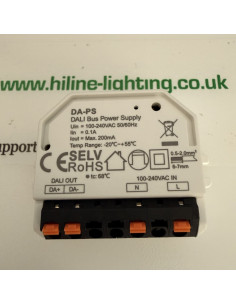
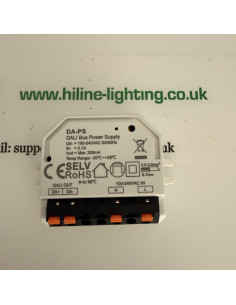
This panel does not power the DALI bus. The DALI terminals need a separate bus power supply. Polarity of that pair does not matter. The panel itself is powered from the mains, 100-240 V AC, on L and N.
The HL-TPS-D-WT is the panel. The DA-PS is a 16 V, 200 mA supply for one DALI bus.
Hi-Line sells these parts and does not design or install the lighting. Please confirm the arrangement on site before it is fitted.